
Cache memory is a small, high-speed storage unit that temporarily holds frequently used data and instructions. It is significantly faster than RAM and is typically embedded within or located close to the CPU. The primary purpose of cache memory is to reduce the time required to access data from the main memory, thereby improving the overall performance of the system.
Whenever the CPU needs data, it first checks the cache memory. If the required data is found there, it eliminates the need to fetch it from the slower RAM, leading to faster execution of processes.
Types of Cache Memory
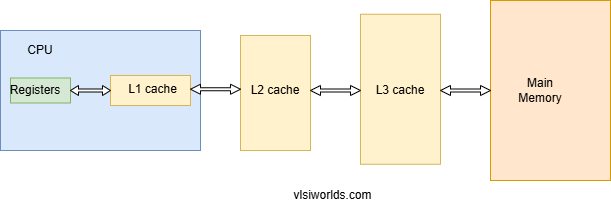
Cache memory is categorized into different levels based on its proximity to the CPU and storage capacity. The three main types of cache memory are:
1. L1 Cache (Level 1 Cache)
- This is the fastest and smallest cache memory, integrated directly into the CPU.
- It has a very low storage capacity, typically ranging from 2 KB to 64 KB.
- Since it is closest to the processor, it provides the quickest access time.
2. L2 Cache (Level 2 Cache)
- L2 cache is larger than L1 cache but slightly slower.
- It can be located either within the CPU or on a separate chip close to the processor.
- Storage capacity typically ranges from 256 KB to a few MBs.
3. L3 Cache (Level 3 Cache)
- L3 cache serves as a shared cache for multiple processor cores in multi-core CPUs.
- It is slower than L1 and L2 caches but significantly improves overall performance by reducing memory bottlenecks.
- Storage capacity ranges from a few MBs to several tens of MBs.
Some high-end processors also include an L4 cache, which is a larger, off-chip cache primarily used to boost performance in specific workloads.
Key Concepts: Cache Hit, Cache Miss, and Hit Ratio
1. Cache Hit
A cache hit occurs when the CPU requests data, and it is found in the cache memory. This leads to faster execution since the data doesn’t need to be fetched from the main memory.
2. Cache Miss
A cache miss happens when the requested data is not found in the cache, forcing the system to retrieve it from RAM. This increases the time taken to access data, slowing down performance.
3. Cache Hit Ratio
The hit ratio is the percentage of memory accesses that result in a cache hit. It is calculated using the formula:
Cache Hit Ratio= Number of Cache Hits / Total Memory Accesses×100
A higher cache hit ratio indicates better system performance, as it means the CPU is frequently retrieving data from the fast cache memory rather than the slower RAM.
Advantages of Cache Memory
- Faster Data Access – Cache memory significantly reduces data retrieval time by storing frequently used instructions closer to the CPU.
- Improved CPU Performance – Since the CPU doesn’t have to wait for data from RAM frequently, processing speed is enhanced.
- Lower Power Consumption – Accessing data from cache memory consumes less power than fetching it from RAM.
- Reduced Latency – Cache memory minimizes delays by ensuring that frequently accessed data is readily available.
Difference Between Cache Memory and RAM
| Feature | Cache Memory | RAM (Random Access Memory) |
|---|---|---|
| Speed | Extremely fast | Slower than cache memory |
| Size | Small (KBs to MBs) | Larger (GBs) |
| Location | Inside or near the CPU | Located on the motherboard |
| Purpose | Stores frequently used data | Stores active programs and data |
| Volatility | Volatile | Volatile |
| Cost | Expensive | Less expensive |
Cache memory is optimized for speed, while RAM is designed for larger storage capacity. Both work together to improve system performance.